Setting up a budget
Five limits, all off by default, and what each one stops.
Nothing is allowed until you allow it. A new agent cannot spend anything, and that is the starting state rather than a step you missed.
All five limits are checked before any money moves. Every one has to pass.
Per day
total across the day
Per job
ring-fenced amount
Per purchase
largest single buy
Who it may pay
sellers you allow
Ask me first
above your threshold
Every purchase is checked against all five before a wallet is asked to sign
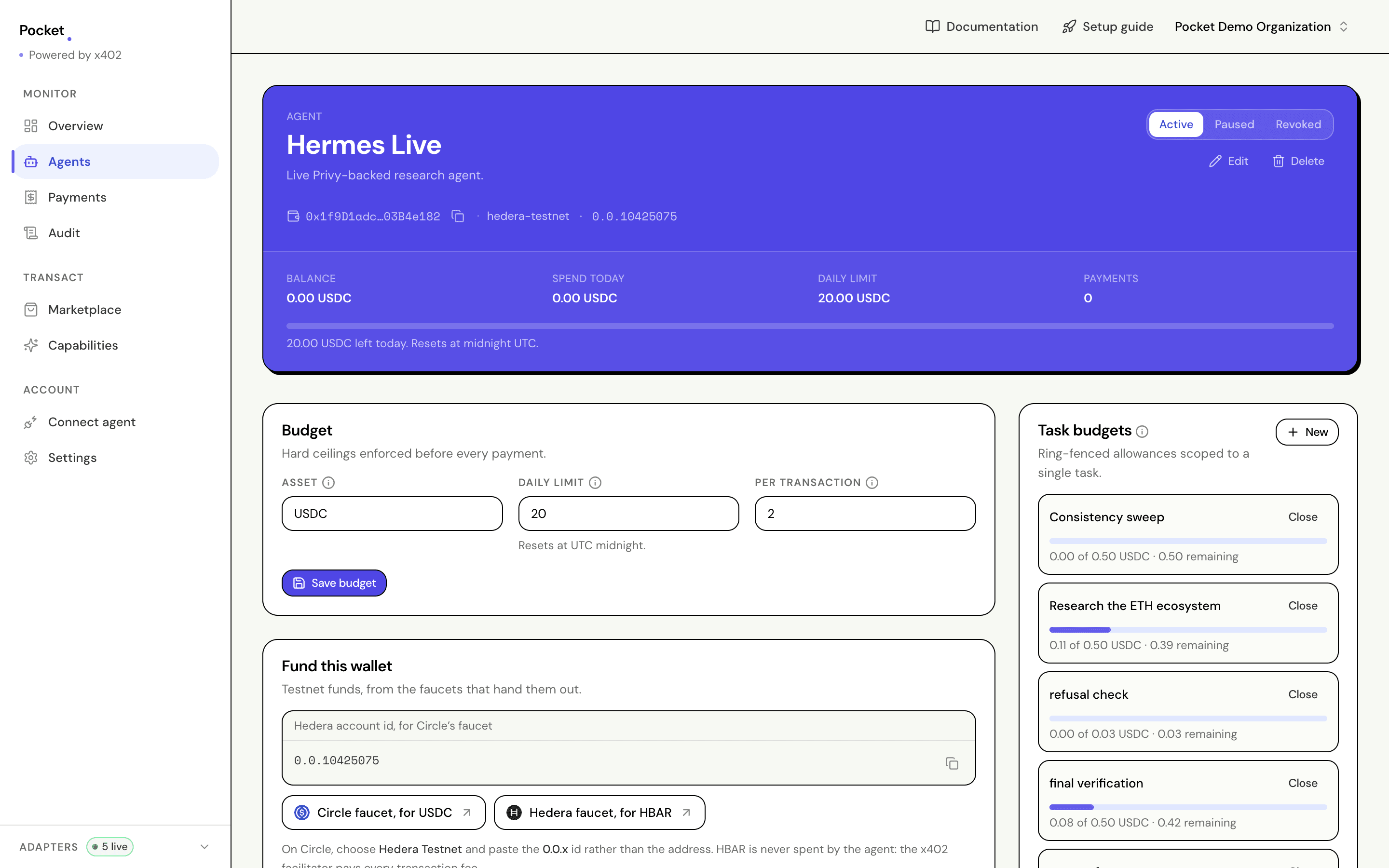
How much a day
On the agent's page, the Budget panel. This is the ceiling across everything the agent buys in a day, and it resets each midnight.
Purchases still in flight already count against it, so two requests arriving at once cannot both slip through on the same remaining balance.
Start small. You can change it whenever you like, and it takes effect on the next purchase.
How much per job
A separate, ring-fenced amount for one piece of work, opened from the Task budgets panel or by the agent itself.
It sits alongside the daily limit rather than replacing it, so a purchase has to fit both.
This is what stops a stuck agent burning a whole day on one task. It loops inside its envelope, runs out, and stops.
How much at once
Two places set this, and both are checked.
Per transaction, in the Budget panel, is the ceiling in the asset the agent spends. Max transaction amount, in the Policy panel, is the same kind of rule expressed as part of the policy document. A purchase has to clear both.
There is also a dollar ceiling, maxUsdPerTransaction, which the API accepts on
a policy but the dashboard does not yet offer a field for. It bounds the value
rather than the token count, which matters when the asset can move.
If you set a dollar limit and live pricing is unavailable, Pocket refuses the purchase rather than guessing. Setting a limit in dollars means dollars matter, and quietly ignoring it because a price feed was down would be the wrong reading of that.
Who it may pay
In the Policy panel. Keep a list of sellers you trust. For anyone not on it, you choose what happens:
| Setting | What happens |
|---|---|
| Block | Refused outright |
| Ask me first | Held until you approve it |
| Allow | Goes through, still subject to every other limit |
The same panel controls which assets and chains are allowed, and which kinds of spend are, so you can let an agent buy data but not compute.
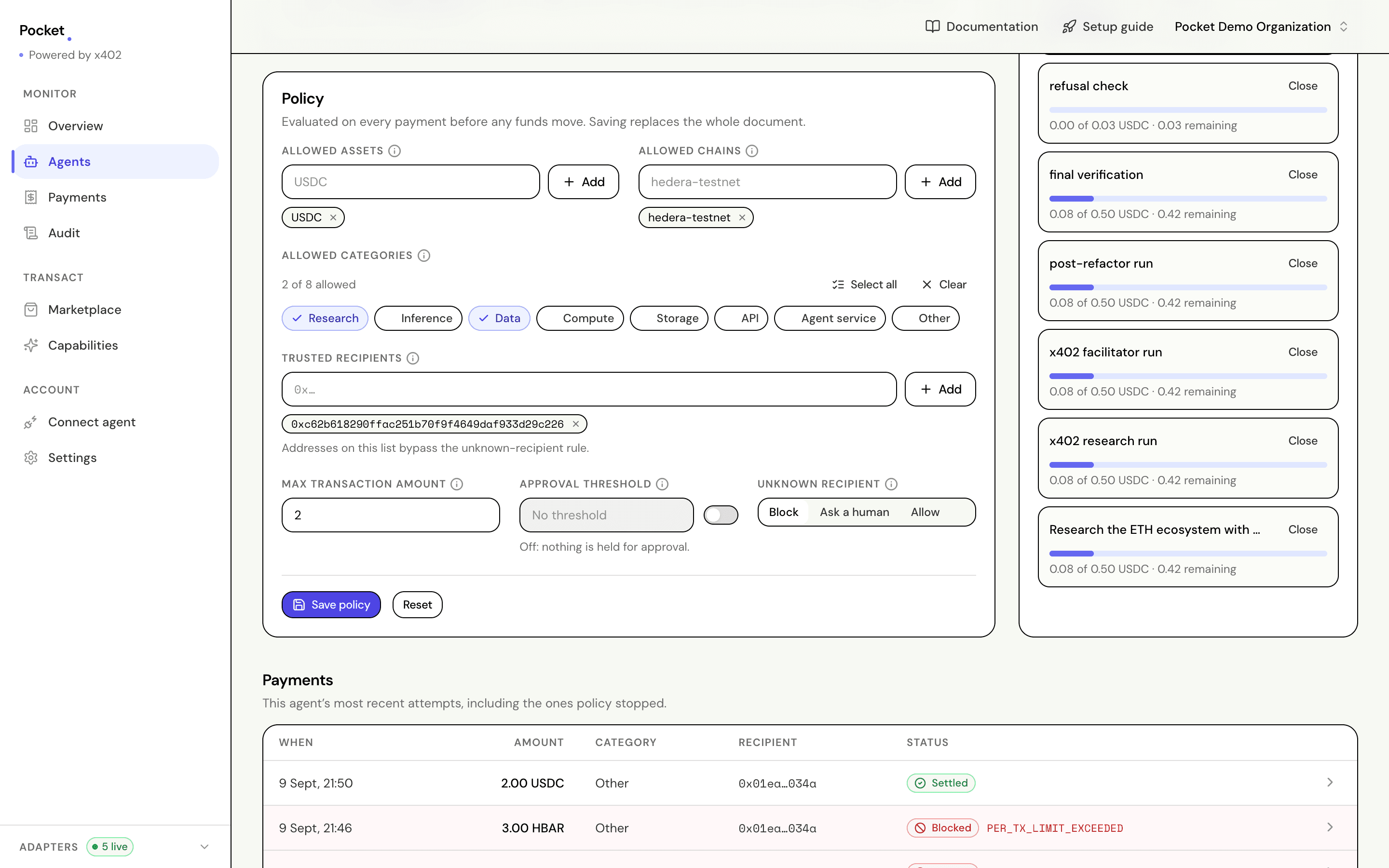
Saving replaces the whole document rather than patching it, which is why the panel shows every field at once: what you see is what will be enforced.
When to ask you
The approval threshold, also in the Policy panel. Above an amount you pick, a person has to release the purchase.
The agent waits, and nothing is signed while it does. You approve or reject from the payments screen.
Testing a limit before you rely on it
Ask for the decision without the purchase. POST /v1/payments/preview runs the
real engine against your real limits and answers with what would happen, without
recording anything or spending a cent.
POST /v1/payments/preview
Authorization: Bearer pocket_sk_...

{
  "agentId": "agent_1a2b3c",
  "amount": "0.75",
  "asset": "USDC",
  "chain": "hedera-testnet",
  "recipient": "0x...",
  "category": "data"
}
A connected agent can ask the same question itself, through the
pocket_preview_payment tool. That is the more useful half: an agent that
checks first picks something it can afford, rather than finding out by being
refused.
When something is refused
Open the row on Payments. It names the rule that stopped it and how much room was left:
Refused      Full market report
Amount       0.75 USDC
Seller       market-data.example.com
Rule         per-job budget
Left         0.03 of 0.50